
API#
The API screen serves as a reference for available API methods in Swagger format.
There are now three tabs available on the API screen:
- Swagger
This subsection opens the interactive API documentation. Users can view available requests, their parameters, response structure, and use Swagger as a reference for checking integrations.
.png)
Documentation is also available at the link:
Sherpa AI Server API - Swagger UIaiserver.sherparpa.ru- ReDoc
This subsection opens an alternative view of the API documentation.
.png)
ReDoc is convenient for reading: it is easier to browse method descriptions, data schemas, and required fields for requests.
Token
The Token subsection is intended for managing access tokens to the API in Sherpa AI Server.On the API tokens screen, a table is displayed with a list of created API tokens.
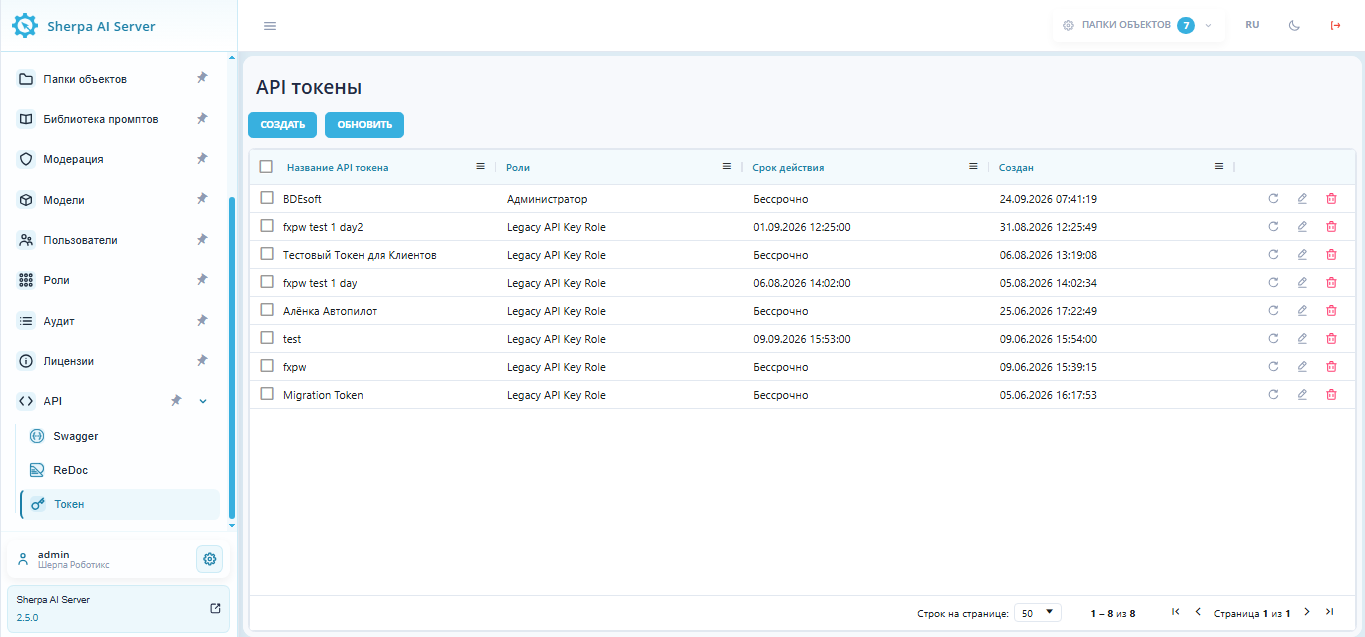
For each token in the list, the following are shown:
| Column | Description |
| API Token Name | Name for the token. |
| Roles | Role assigned to the token. |
| Expiration | Expiration date of the token or "Never expires". |
| Created | Date and time the token was created. |
In each row, the following actions are available for the token on the right:
- update / reissue
.png) the token;
the token; - edit
 the token;
 - delete
 the token.
Regenerating a token immediately invalidates its previous secret. The new secret is shown only once. It is important to copy it and update every integration that uses this token. If the new value was not saved, the token needs to be regenerated again.
Above the table are buttons:
- "Create" — opens a popup window to create a new API token.
.png)
In the window, you need to specify the API token name and select roles from the dropdown list. Both fields are mandatory.
You can also set the token's expiration. If you check the "Never expires" checkbox, the token will be created without an expiration date. If the checkbox is not selected, the "Expiration" field specifies the date and time until which the token will be active. A calendar icon is available for selecting the date.
At the bottom of the window, there are two buttons: "Cancel" closes the window without saving, while "Create" creates a new API token. The create button becomes available after filling in the mandatory fields.
After creation, store the displayed token value securely and use it only in integrations with the roles assigned to it.
- Refresh — reloads the list of tokens on the API tokens screen.
Swagger requests without body parameters#
Requests require a valid API token whose role permits the selected action, or an authenticated session. Requests operate within the current account. The account_guid field is unnecessary: the server determines the account from the token or session.
Before executing a request, its conditions must be checked. Asynchronous execution requires the waiting status. Deletion must be checked only on objects created for this check in a separate Account. An Object Folder with child folders cannot be deleted.
Requests can be executed in Swagger as follows:
It is necessary to open the "Swagger" tab. For API-token authentication, the "Authorize" button must be clicked and the token value entered. Session authentication requires signing in to Sherpa AI Server.
It is necessary to select a method and click "Try it out". It is necessary to enter the GUIDs of existing objects in the path parameters.
For
POST /api/v1/threads/{thread_guid}/runs/{run_guid}/execute_async, an empty JSON object must be left in "Request body":{}This request requires the
Content-Type: application/jsonheader.The following deletion methods have an optional request body. You can send a request without a body or a
Content-Typeheader:DELETE /api/v1/folders/{folder_guid}/files/{file_guid};DELETE /api/v1/folders/{folder_guid};DELETE /api/v1/object_folders/{object_folder_guid}.
Existing JSON requests, including
{}, remain supported. For a JSON body, set theContent-Type: application/jsonheader.It is necessary to click "Execute" and check the response code.
A successful asynchronous launch returns 200 and the in_progress status. Generation completes later. A successful deletion returns 204 without a body. Test deletion on test objects.
For a 403 response, check authentication and role permissions. For 404, check the GUIDs and whether the objects belong to the current account. The run must have the waiting status. An external-response run is completed through an API client. An object folder containing subfolders cannot be deleted.
For a 422 response, check that authentication credentials are present, any JSON body sent is valid, and the Content-Type header is set correctly.