
Version 141857#
24 February 2026
Sherpa Orchestrator version 141857 has been released.
The
POST /api/task/filter/read/{guid}method can now filter Tasks by creation period usingcreatedFromandcreatedTo. Pass both boundaries as Unix timestamps in seconds:createdFromincludes Tasks created at or after the specified time:created >= createdFrom;createdToincludes Tasks created at or before the specified time:created <= createdTo.
Example request body for filtering Tasks by creation period:
{
  "createdFrom": 1717200000,
  "createdTo": 1719791999,
  "maxCount": 100,
  "offset": 0
}
When creating or editing a Trigger through the API, you can set
priority. Orchestrator processes Triggers in descending priority order and, when priorities match, by creation date. The default priority is0.Example request body for creating or updating a Trigger:
{
  "name": "Daily report trigger",
  "description": "Run the daily report",
  "enabled": 1,
  "status": 1,
  "processing_type": 2,
  "cron": "0 9 * * *",
  "process_id": 123,
  "robot_id": 45,
  "priority": 10
}
A button at the bottom of the sidebar now shows the current Orchestrator version, for example,
Sherpa Orchestrator v.141857. The nearby.png) icon opens the corresponding release information in the Sherpa RPA Knowledge Base.
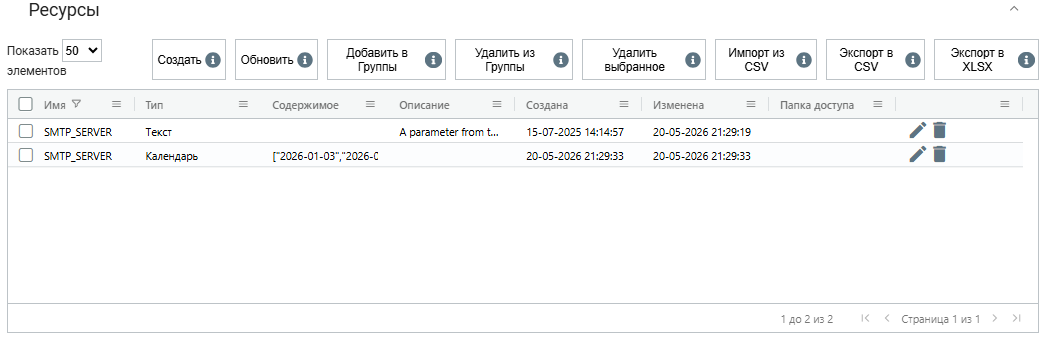
icon opens the corresponding release information in the Sherpa RPA Knowledge Base.The name filter on the Resources screen now shows all Resources with the same name. You can distinguish them by type, description, access folder, and other table columns.
Example:
You can switch between light and dark interface themes using the
.png) toggle at the bottom of the sidebar.
toggle at the bottom of the sidebar.On the Robots screen, you can select a Robot and open its remote desktop over VNC. The
 icon appears beside the edit and delete actions. The User needs permission to read Robots, and the Robot must have a machine IP address.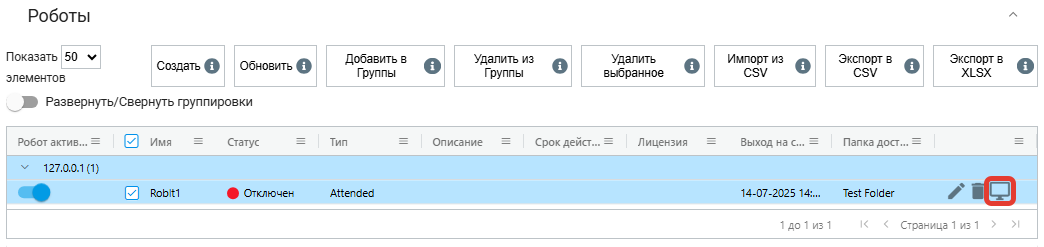
Data tables, forms, and the sign-in page have been improved: viewing, filtering, and refreshing tables is easier. Forms display and process entered values more reliably. And visual and interaction errors occur less often.
The account tab in the API menu has been renamed to align with Orchestrator terminology.
API responses for retrieving Tasks now use structured JSON, making integration with external systems, Robots, and scripts easier.
Task loading is faster when Robots send many messages. Users may notice a quicker response and more stable Task lists on busy installations.
Additional minor fixes and stability improvements are included.